
Episode reminders
A daily briefing of the episodes scheduled in your Library, on the day before, the day of, or both.
Episode reminders send you one short briefing on the days your shows have episodes scheduled. Shows builds them on your device from your Library, so they work without a connection.
Turn reminders on
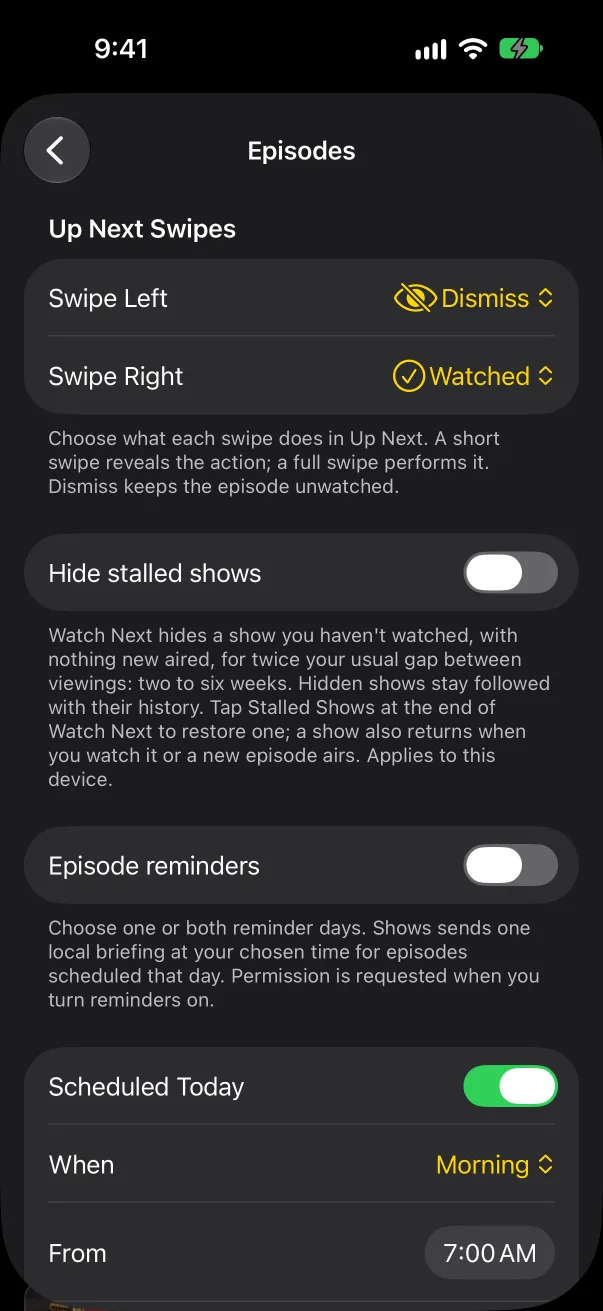
By default you get one reminder at 9:00 AM on the day of the episode. The time is in your current time zone. At least one of Day before and Day of stays on while reminders are enabled.
If you turned on reminders when you first signed in, they're already set up.
What a reminder looks like
- One episode: the title is the show's name, and it says, for example, "S1, E3 is scheduled for today". Touch and hold it and choose Mark Watched once you've seen it, or tap it to open the show.
- Several episodes: "3 episodes scheduled for today", listing up to three and "+2 more".
Reminders vs. alarms
| Episode reminders | Episode alarms | |
|---|---|---|
| Covers | The next episode Up Next shows for each show, within 60 days | One episode, or every episode of one show |
| When | Your chosen time, day before or day of | Your chosen time on the air date |
| Turned on in | Settings → Episodes | Up Next or the show's … menu |
Alarms still go off when daily reminders are off. A show in Binge Mode gets no day-of reminder, but its day-before reminder and alarms still go off. While a binge waits for the rest of its episodes, the show gets no day-of or day-before reminders; alarms still go off, and with reminders on, Shows notifies you at your reminder time on the day the binge is ready. If Shows learns it's ready only later, it notifies you once then. See Ready notification.
A show On Deck gets no daily reminders, and a binge on it doesn't send its ready notification until you pick the show back up. Alarms you set still go off.
Reminders are per device
Reminder settings live on each device. Turning them on for your iPhone doesn't turn them on for your iPad.