
Send feedback
Report a problem, suggest an idea, or ask a question from inside Shows.
The quickest way to reach the Shows team is from inside the app.
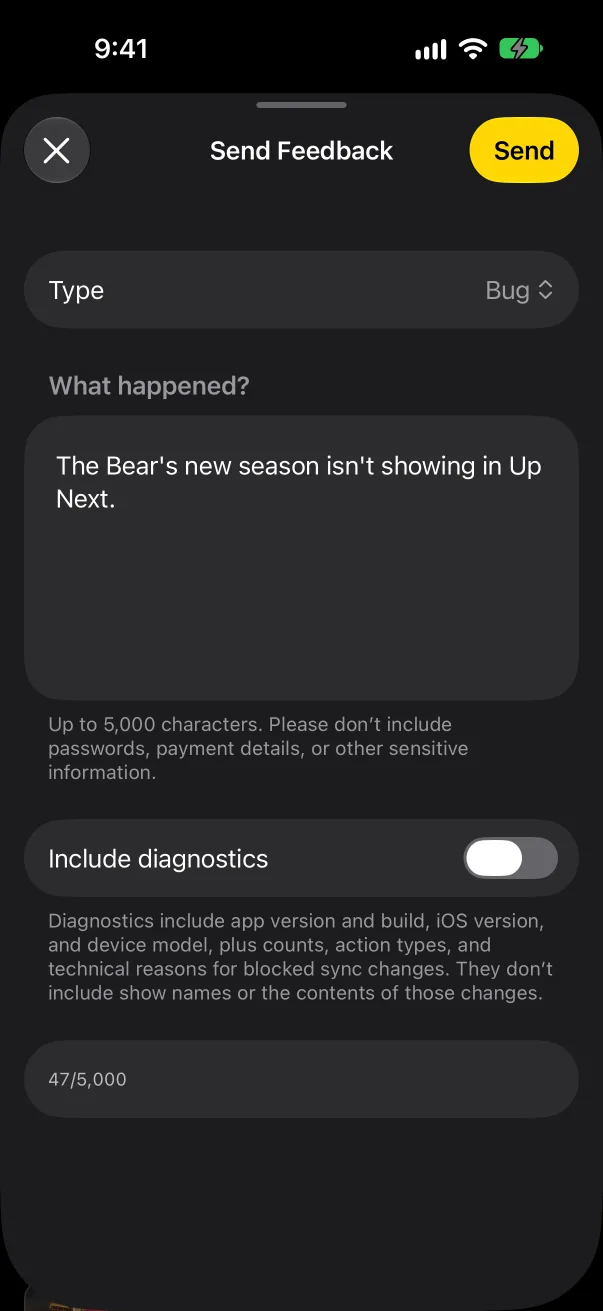
Open Settings and tap Send Feedback. If you've turned on Shake to Send Feedback, you can shake your device instead.
Choose a Type: Bug, Suggestion, Question, or Something else.
Describe what happened in up to 5,000 characters. Please don't include passwords, payment details, or other sensitive information.
When it's sent, Shows shows Feedback Sent with a reference you can quote if you follow up.
What diagnostics include
Include diagnostics is off by default and applies to this report only. It adds your app version and build, iOS version, and device model, plus counts, action types, and technical reasons for any changes that couldn't sync. It never includes show names or the contents of those changes.
If sending fails
| Message | What to do |
|---|---|
| Check your connection, then try sending your feedback again. | Reconnect and tap Send again. |
| You've sent feedback recently. Please wait a moment and try again. | Wait a minute, then try again. |
| Shorten your feedback to 5,000 characters or fewer. | Trim your message. |
| Sign in to send feedback. | Sign in first. |
Tapping Cancel with a message typed asks whether to discard it, so you won't lose a report by accident.
If you cannot open Shows, email support@shows.gg. Include what happened and the app version if you know it.